-

-

-

-

-
复制到剪贴板
CH Robinson is here to make life easier with simple tools for tracking updates.
Now it's even easier
with quick tracking,
a new way to stay connected with Navisphere Carrier.
Tracking used to mean too many apps,
too many steps,
too much wasted time.
Now it's just one step.
We send a secure link,
you tap and go
click the SMS link anytime before your appointment window.
We won't start tracking until the scheduled time.
Tracking starts 4 hours before pickup
and with built-in tracking indicators,
you'll know exactly when your location is being shared.
See load details and location history all in one place.
Plus,
there's no login required.
Once you arrive,
tracking stops automatically,
or you can end it any time.
Skip the hassle,
save time,
move
faster.
Quick tracking is another way CH Robinson helps you haul smarter
every load,
every mile.
Because
we're committed to empowering your business at every turn.
Like no one else.
``Quick Tracking: One‑Tap Load Tracking for Truck Drivers via Text Message
Quick Tracking in Navisphere® Carrier makes load tracking as simple as a tap. Drivers will receive a text message with a secure link that opens the app with no login or password, and automatically starts tracking within 4 hours of pickup—then stops at delivery (or drivers can end it anytime). With clear “Tracking Active/Inactive” status and full tracking logs, carriers get the visibility customers expect while drivers stay in control—and if you prefer automated tracking via ELD/GPS, nothing changes.
If you have additional questions, you can find helpful answers in our FAQs.
Quick Tracking FAQ's
When it comes to hauling for C.H. Robinson, you have questions, we have answers.
Q: What is quick tracking?
Quick tracking is an easy and convenient way to share location updates for a shipment using the Navisphere Carrier app, without needing to log in. You’ll receive a text message with a link. Tap it, and tracking starts automatically during the appointment window. It’s that simple.
Q: Who is tracking for?
Quick tracking is available to all drivers. It is perfect for:
- Drivers who prefer a faster, simpler option
- Drivers who don’t have a Navisphere Carrier login
- Dispatchers supporting multiple drivers or spot loads
No username or passwords required
Q: Can I use quick tracking if I have a Navisphere Carrier app login?
Yes. Although quick tracking is available without login, drivers with an account will benefit from same simple tracking benefits plus expanded in-app shipment information.
Q: Do I need to download an app?
Although you don’t need a login, you will need the Navisphere Carrier app installed on your phone. If the app is not already installed, you can download it from the appropriate app store:


Q: How do I start tracking a load?
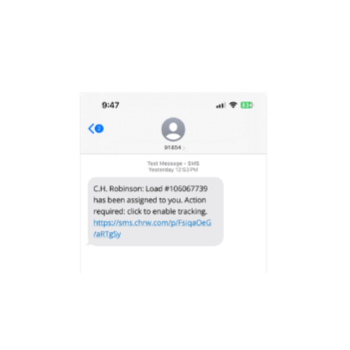
- You’re assigned a shipment
- You receive a text message with a quick tracking link from our phone number: 91854
- Tap the link
- Follow any steps on screen to enable location permissions
- Tracking starts automatically when the shipment window begins (within four hours of the scheduled pickup time)
That’s it! No extra steps. For more detailed instructions and troubleshooting information, check out our How-To Guide.
Q: Will I know when i'm being tracked?
Yes. You’ll see clear messages in the app:
- “Tracking Active” when tracking is on
- “Tracking Inactive” when tracking is off


The app clearly shows when tracking is active or inactive, so there are no surprises.
Q: Can I track more than one load?
Yes. If you receive quick tracking links for multiple shipments, each shipment will appear separately in the app. Make sure to click the tracking link for each individual load.
Q: What permissions do I need to allow?
You’ll need to allow location permissions in the Navisphere Carrier app.
Important to know:
- If location permissions are turned off at any point, tracking won’t work
- Make sure permissions are turned on before pickup
- If prompted, follow in-app instructions to enable the correct location permissions
Q: What happens if I don’t click the link?
We send a series of links to ensure the driver has ample opportunity to start tracking.
- The first link is sent at shipment assignment.
- The second link is sent 3.5 hours before the pickup appointment window opens
- The third depends on appointment window
- If the appointment window is over an hour: the final text will be sent 30 minutes before the middle of the appointment window.
- If the appointment window is less than an hour: the final text will be sent 30 minutes before the appointment window opens.
If the link isn’t clicked, tracking won’t start for that shipment. It’s therefore encouraged to click the link as early as possible to ensure you are set up and ready to track.
Q: Is quick tracking always on?
No. Quick tracking only runs when a shipment is active. You are not tracked before or after the shipment window.
Q: What if I need help?
If you have questions or run into issues:
- A how-to guide is available to drivers and dispatchers. Check it out now.
- More information can be found on our tracking website. Explore for updates and resources.
- Check for messages in the Navisphere Carrier app
- Contact support through the app
Thank you for being our valued partner. As always, we encourage you to reach out to your carrier rep at C.H. Robinson for any further questions or concerns.